Persona-Specific Demo Scripting for Multi-Stakeholder Sales
Tailor your demo to each stakeholder's actual decision trigger, not a generic pitch.
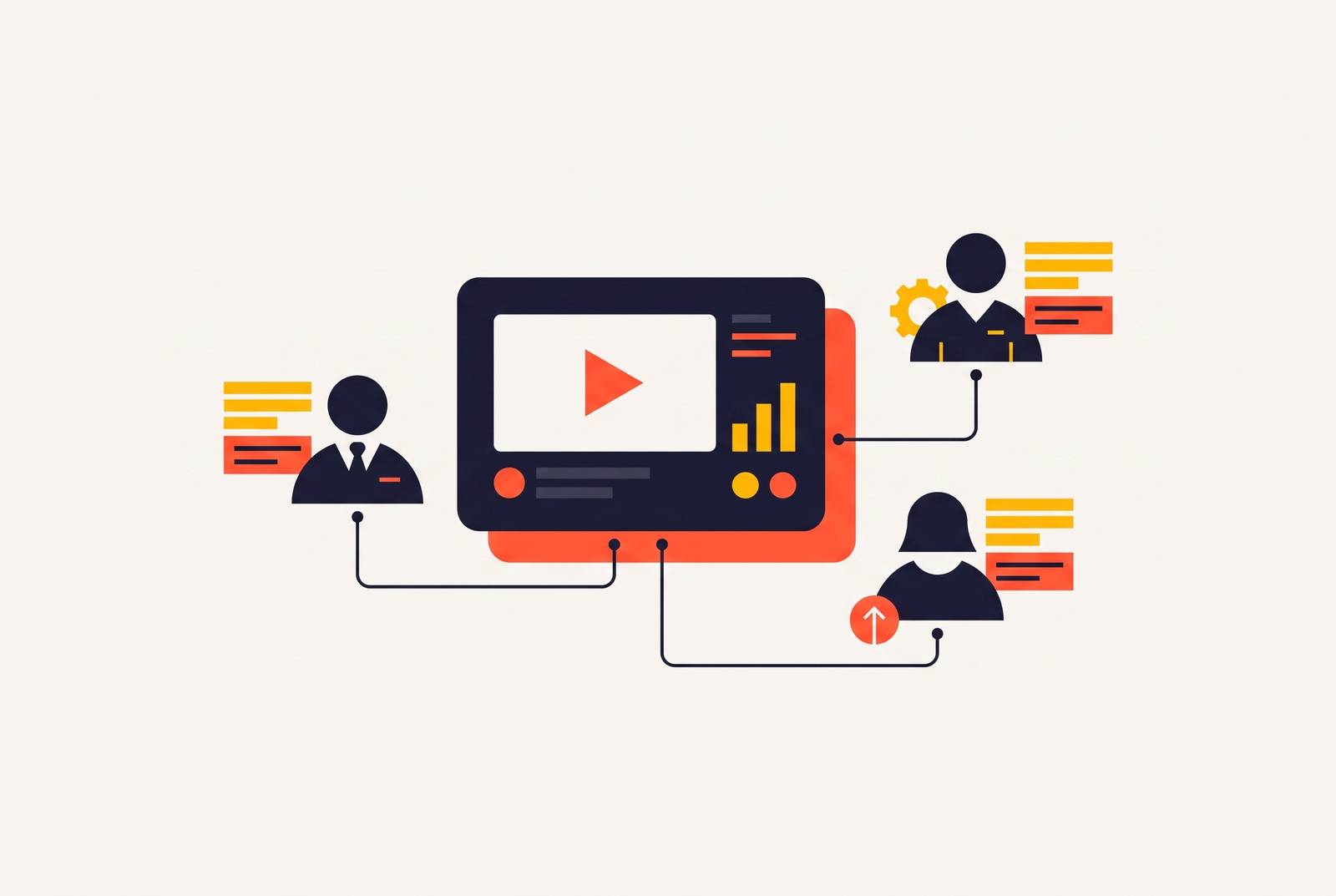
Picture the call. Eight boxes on a screen, one shared slide deck, and a sales rep about to deliver the exact same twenty-two-minute pitch to everyone in the room. By minute four, the CEO is answering emails. By minute eight, the IT lead has muted himself to vent to a colleague in a side chat. This is what happens when one script tries to serve a buying committee of six to ten people: a CEO filtering for growth impact, an IT lead waiting on integration details, an operations manager who needs to see the actual workflow, and an end user who just wants to know if the thing is easy to use are different audiences, not the same audience wearing different name tags. A script built for one of them personalizes for exactly one person and leaves the rest cold.
The quiet ones are the dangerous ones. The stakeholder who says nothing on the call is often the one holding veto power in the internal meeting the rep never gets invited to, and a demo that ignores that person isn't a missed opportunity so much as a disqualification that happens without anyone announcing it. Apollo's 2026 analysis names the shift directly: the demo is now a full ecosystem, not a one-time event, and sales teams still leaning entirely on live, rep-led demos are leaving pipeline sitting on the table, untouched, like a plate nobody cleared.
What each stakeholder role uses as a decision trigger
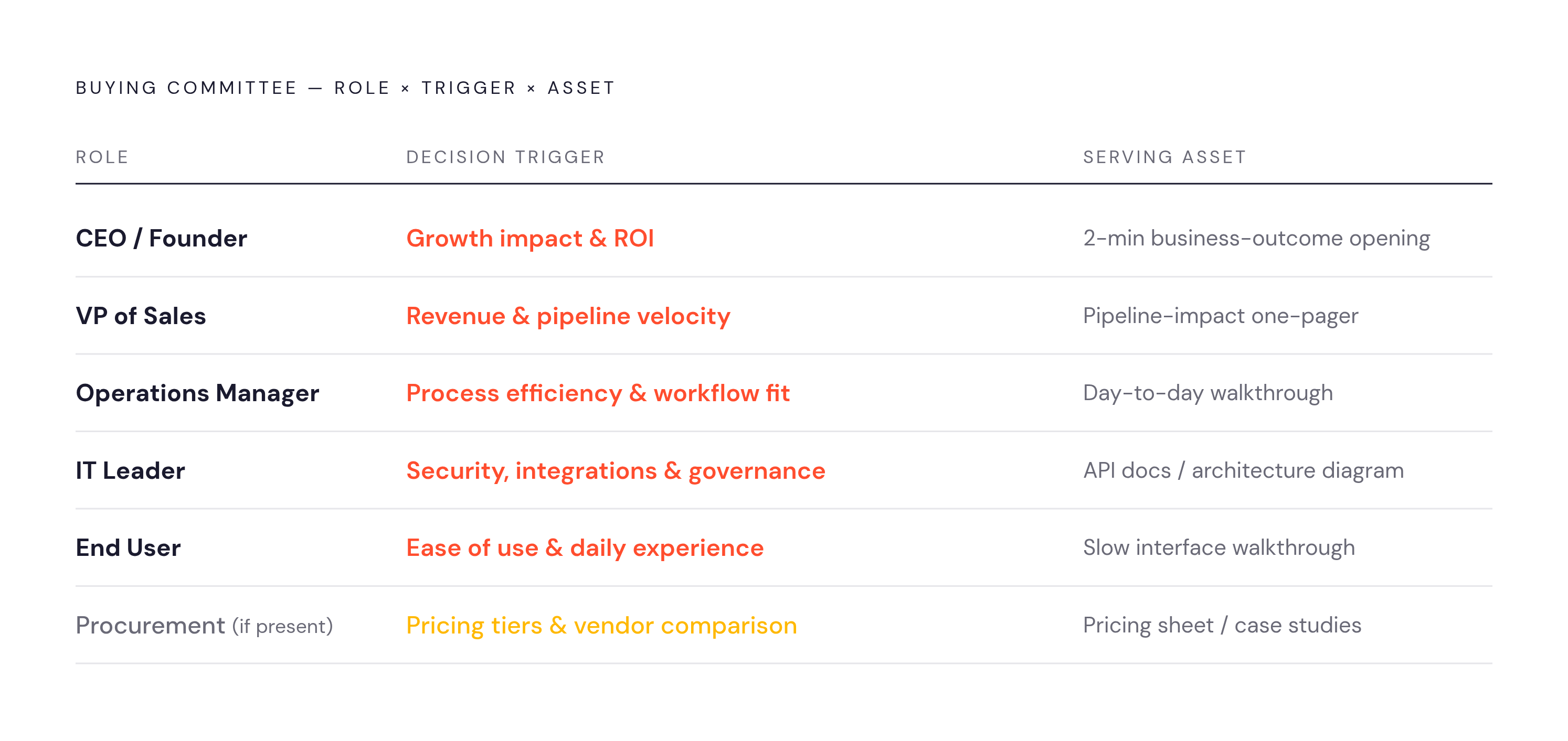
Five roles show up on most SaaS buying committees, and each one filters the same demo differently. The CEO or founder is checking for growth impact, ROI, and strategic alignment, so the opening needs business outcomes delivered at altitude, in about two minutes, before attention drifts. The VP of Sales wants the product tied directly to revenue impact and pipeline velocity. The operations manager cares about process efficiency and workflow fit, and needs the day-to-day made tangible and walkable, not described. The IT leader is scanning for security, integrations, and data governance, so a backup technical artifact should be ready before the question even lands. The end user just wants to know about ease of use and daily experience, best shown by clicking through the interface slowly enough that they can picture their own hands on the keyboard.
Procurement deserves its own line on this list when it shows up, filtering on pricing tiers, contract terms, and vendor comparison. Apollo's committee-ready demo framework treats procurement as a distinct stakeholder with its own asset, not a footnote tacked onto the CFO conversation.
None of this works as a checklist read at face value, because the stated concern and the actual decision trigger are rarely the same thing. An IT lead asking about uptime is often really asking about integration risk. An operations manager asking about reporting is often really asking whether the new workflow will break the one they've already built their team around. The script has to answer the trigger behind the question, not just the words in it.
Swapping in a company logo and the prospect's name is not personalization, it's mail merge with better fonts. Apollo's framework is specific about what real personalization looks like: showing a CFO the financial reporting module and showing a VP of Operations the workflow automation view, within the very same deal, because they are evaluating entirely different products.
Building a stakeholder map before the script exists
No script should get written before the stakeholder map does. The map is the ten-minute piece of pre-work that separates a demo that converts from one that gets a polite "thanks, we'll loop back" and silence. Without it, the script is a guess dressed up as a plan.
Building it is a discovery conversation, not a research project. Ask directly who's attending the call, what each of them owns day to day, and whose pain triggered the evaluation. From those answers, sketch something simple: name, role, likely priority, and the one thing that needs proving to that specific person. Four columns, no more.
There's a clean test for whether the prep is done. If every attendee can be named along with their role and their primary concern before the slide deck even opens, the demo is ready to run. If any of that is missing, it isn't ready yet, no matter how polished the deck looks.
The guest list itself is worth reading closely, because who's missing matters as much as who showed up. An absent stakeholder is often the one who kills the deal in a meeting the rep will never see happen. A few sharp discovery questions surface most of this fast: what prompted the evaluation, and whose pain is driving it; what does success look like for this specific team; and what would make this person say no after watching the demo. Answers to those three questions do more prep work than an hour of generic account research.
Structuring a live multi-stakeholder demo in four chapters
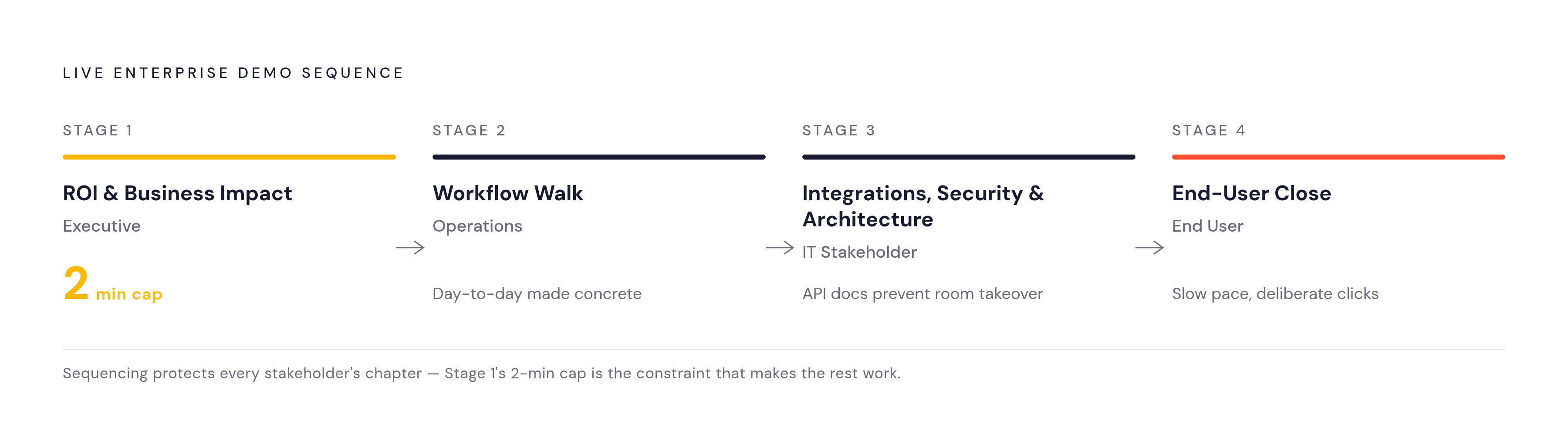
The strongest live enterprise demos don't juggle four separate pitches improvised on the fly. They run one coherent meeting built in four intentional chapters, with persona-specific tracks ready so the rep can pivot without rebuilding anything live, mid-call, under pressure. One narrative, four doors into it.
The sequence that tends to work across the five common roles opens with ROI and business impact for the executive in the room, capped at two minutes, because the CEO's attention has a short fuse and the headline needs to land before it burns out. From there the demo moves into the workflow walk for operations, making the day-to-day visible and concrete. Next comes integrations, security, and architecture for the technical stakeholder, paired with a backup artifact, API docs or an architecture diagram, so that deep technical questions don't hijack a room full of people who didn't come for a systems review. The close belongs to the end user: slower pacing, deliberate clicks, enough space for that person to picture themselves actually working inside the product.
Keeping the technical stakeholder from running away with the clock takes one simple move: name the structure out loud at the start of the call. Tell the room that the meeting will cover the business case, then the workflow, then the technical architecture. Once everyone knows their chapter is coming, nobody needs to interrupt someone else's.
"We'll follow up" is a way of saying goodbye, not a next step. And the feature dump, the instinct to show the whole product catalog because it's all built and all impressive, is the chapter structure's natural enemy. Nobody on that call needs to see everything the product does. They need to see their problem solved, in their chapter, and then move on. This same four-chapter shape, as it turns out, is about to do double duty as the blueprint for everything that happens after the call ends.
Translating the live chapter structure into modular async scripts
The chapter structure built for the live call doesn't retire once the meeting ends. It becomes the architecture for an async follow-up library, where each chapter turns into a standalone clip the champion can forward to exactly the stakeholder who needs it, instead of mailing a 45-minute recording to everyone and hoping someone finds the relevant ten minutes. A two-minute, CFO-focused clip sent after the live call reinforces the financial case on its own, without booking a second meeting just to say the same thing again.
Each async chapter follows the same four-part arc. It opens with the problem stated in the buyer's own language, not the product's marketing language. It names the before state, the specific friction or gap that stakeholder is living with right now. It demonstrates the one capability that resolves that particular trigger, nothing else. And it closes with a measurable result paired with a clear next step, telling the viewer what changes and what to do about it.
Labeling carries more weight here than most reps expect. A clip titled "Financial impact and payback period" gets watched by a CFO. A clip titled "Demo follow-up" gets filed, and possibly never opened. Apollo's committee-ready demo package assigns a distinct set of assets to each role to make that labeling concrete: the economic buyer gets an ROI calculator, payback period figures, and a business case summary; IT gets an integration walkthrough, API documentation, and sandbox access; security gets a data handling overview and certifications; end users get a workflow demo and an onboarding timeline; procurement gets pricing tiers and a vendor comparison. Each bundle answers one trigger and nothing else.
The real payoff of building the library this way is what it does to the champion inside the deal. A champion who can send the CISO a security clip and the CFO a financial clip, independently and on their own schedule, is no longer paraphrasing a demo from memory in an internal meeting the rep isn't in the room for. Each stakeholder evaluates the product through their own lens, directly, without needing another live call to make it happen.
Recording persona-specific demo clips without a production team
A persona-specific clip is a screen recording built around a tight script, and treating it like a full video production is why most reps never get around to making one. The setup discipline matters more than the gear.
Before hitting record, the desktop should get cleaned, stray files and notification pop-ups cleared out, because nothing undercuts a financial-impact clip faster than a calendar reminder sliding across the screen mid-sentence. The product itself should start from the same controlled state every time, using consistent demo data and a predictable opening screen, so any clip pulled from the library feels like part of the same family. Chat apps and sync notifications get closed for the same reason the desktop gets cleaned: visual noise reads as unprofessional even when the product underneath it is excellent. Recording at 1080p isn't optional vanity, either, since a grainy clip makes a sharp product look cut-rate regardless of how well it performs.
Pacing is where most of these clips quietly fail. The instinct under recording pressure is to move fast, but the discipline that actually works is the opposite: pause on each screen for a beat before clicking, give the viewer time to read the interface, and treat the feeling of going too slow as a decent sign the pace is actually right. Audio is the other place quality breaks down, and a basic external microphone outperforms a laptop's built-in mic by enough margin that it matters more to how professional the clip feels than any camera upgrade would.
One workflow choice makes the whole process easier to manage: record the screen first, then read the script against that rough footage. Separating the two produces tighter pacing and cleaner delivery, and it means a single visual fix doesn't force re-recording the entire voiceover from scratch.
Editing and packaging the clip so the right stakeholder watches it
A clip with a sharp script is wasted the moment it's hard to watch or hard to find. Editing and delivery aren't finishing touches, they're half the job. The best script in the world loses to a bad filename.
For reps who've never touched a timeline editor, transcript-based editing removes the main barrier: delete a word or phrase from the transcript, and the matching audio and video disappear with it. No scrubbing, no guessing where a cut lives on a timeline. Auto-captions belong on every clip by default now, not as a nice extra, since a large share of business video gets watched with the sound off, and a CFO reviewing a financial-impact clip in a silent office needs the captions to follow the argument.
Delivery deserves the same care as the content. The clip's subject line and link text should name the role and the trigger directly, something like "How this product cuts your finance team's reporting cycle," which converts noticeably better than "Demo follow-up" ever will. Each stakeholder should get their specific clip sent to them directly rather than buried as one chapter inside a long recording, and the champion, not the rep, should be the one forwarding the full library internally to the rest of the committee.
A digital sales room model turns all of this into a signal, not just a delivery mechanism. Knowing that the CFO opened the financial-impact clip twice and then forwarded it to procurement tells a rep more about where a deal actually stands than a follow-up call could surface in the same stretch of time.