Cold Outreach Video Scripts for SaaS SDRs
Video outreach beats broken email and LinkedIn channels for SaaS SDRs.

Cold video outreach exists because the two channels SDRs grew up on broke. Cold email reply rates in B2B SaaS have fallen to among the lowest of any B2B sector, and the reason isn't mysterious: inboxes are flooded, and AI-generated message volume is burying the handful of real signals that used to get through. LinkedIn InMail has taken a similar hit. Templated, automated sends have lost most of their punch, even though a genuinely personalized InMail still beats cold email by a wide margin.
Video sidesteps the problem instead of fighting it. A face, a voice, and a screen recording of the prospect's actual website or LinkedIn profile is something AI-generated text simply cannot fake. It's a pattern interrupt built out of proof, not promises. This format earns a slot in the cadence because it appears in a channel that hasn't been strip-mined yet.
Signal timing decides whether the script lands
A well-written script sent at the wrong moment is still a wrong moment. Generic video, no matter how clever the hook, underperforms when it arrives with no connection to what's actually happening at the prospect's company right now. Teams running signal-based selling see meaningfully higher response rates than teams blasting cold video with no trigger behind it. The gap is wide enough that sourcing the signal has to come before the script gets written.
This is why the best screen recording opener in prospecting has never been a product demo. It's a recording of the prospect's own website, their LinkedIn profile, or a piece of content they published, with the SDR narrating what they noticed and why it mattered. That single choice is what separates attention that's proven from attention that's claimed.
A few signal categories carry the most weight for SaaS SDRs. Funding announcements (Series A, B, C rounds) mean a company is scaling fast and needs to ramp its SDR team and tooling quickly, which creates a short window where outbound help is relevant by definition. A job listing for outbound sales roles is a direct, public signal that a company has decided outbound capacity matters right now. Executive changes, especially a new VP of Sales, open a process review window that tends to run through the first 90 days on the job. Watching for these gives the script in the next section something real to hook into. Skipping them turns the best-written script in the world into a nicely produced piece of spam.
The four-part structure that fits inside 90 seconds
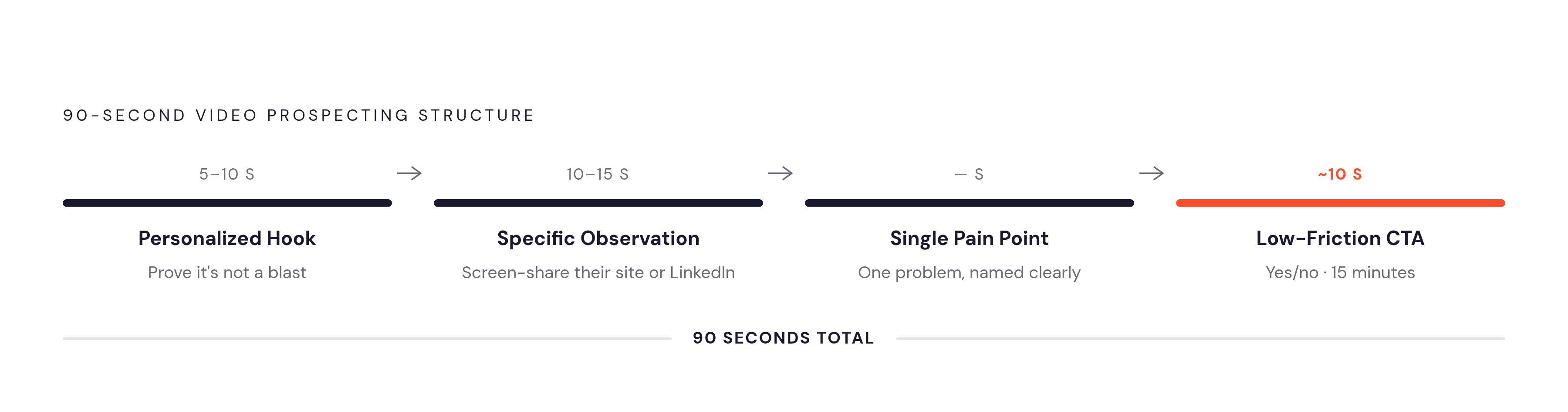
A cold video prospecting message works when it follows four parts, in order, finished inside 90 seconds. Each part has one job. None of them get to run long.
The personalized hook runs 5 to 10 seconds. The first five seconds decide whether the prospect keeps watching, so the hook has to prove, immediately, that this isn't a mass blast. "I saw your Series B announcement this morning" does that job. "I've been following your company" does not, because anyone could say it to anyone. The hook stays entirely about them. The SDR's company and product don't get a mention yet.
The specific observation runs 10 to 15 seconds. This is where the screen comes up: their website, their LinkedIn, the blog post that triggered the whole reach-out. The SDR says, out loud, what caught their eye and why. The video's observation is what proves research happened. The observation has to be specific enough that it couldn't apply to any other company on the list, because a generic observation wastes the one advantage screen-sharing gives you.
The single pain point gets its own short beat, tying the trigger to a problem the SDR's product actually solves, without trying to cover every feature in the catalog. One pain point, named clearly, beats three pain points mentioned in passing.
The low-friction CTA closes the video in about 10 seconds. Drop "book a 30-minute call." Ask a yes or no question instead: "Does this match anything on your roadmap this quarter?" or "Worth 15 minutes to show you what changed for them?" Time-boxing the ask matters here. "15 minutes" closes far more often than "a call," because a call is an open-ended commitment and 15 minutes is a number a busy person can actually picture fitting into a Tuesday.
Video's place inside the full cadence
One video, sent in isolation, leaves most of its value on the table. It earns its keep when it's placed at the right points in a sequence, where the prospect has enough context to recognize who's sending it, but not so much context that the video becomes redundant.
The highest-converting sequences use video at two specific moments. At Touch 1, the cold intro, the four-part script above does all the work on its own, since there's been no prior contact and the hook carries the entire weight of the open. At Touches 6 or 7, the breakup or re-engagement moment, the video changes personality entirely: lower production pressure, a conversational tone, and explicit permission for the prospect to opt out.
Multi-channel context makes every video stronger. An email that references a voicemail that references a LinkedIn connection request means the video never actually arrives cold. By the time the prospect clicks play, they've seen the sender's name two or three times already. The cadence works like a relay: phone, email, and LinkedIn each prime the next touch, and video gets slotted in at the points where a face and a screen carry more weight than another paragraph of text would.
Four scripts for the scenarios SDRs hit most often
The four-part structure doesn't change across scenarios. What changes is where the hook comes from, which pain point gets named, and how the CTA is phrased. Having this language ready in advance removes the blank page that an SDR otherwise has to stare at every morning.
Scenario 1, funding trigger (Series A or B). Hook: "Saw you closed your Series B this morning, congrats." Observation: pull up their careers page or LinkedIn and point to active SDR hiring. "Looks like you're building out the outbound team. I can see a few sales roles live." Pain point: "Companies at your stage usually hit a wall on SDR ramp time around now." CTA: "Is ramp time something on your radar this quarter, yes or no?"
Scenario 2, content trigger. Hook: name the piece of content directly. Observation: show the post on screen and highlight the exact line that prompted the outreach. Pain point: connect what they wrote to the broader problem the product solves, without pretending to fix everything the post touched on. CTA: "Does the approach we take match anything you're thinking about solving, worth a quick yes or no?"
Scenario 3, competitor mention or comparison page. Hook: show their comparison page or a G2 review they left. "I noticed you're actively comparing tools in this space." Observation: acknowledge the evaluation is already happening, not hypothetical. Pain point: name the criteria most relevant to their stage and team size. CTA: "Happy to show you how we stack up in 15 minutes, does that make sense given where you are in the process?"
Scenario 4, re-engaging a stalled deal (the breakup video). Hook: reference the prior conversation by name. "We spoke in [month], I wanted to check in one last time." Observation: show what's changed since then, a new feature, a new customer result, a shift in the market. Pain point: keep it light. CTA: "One word back is all I need, still relevant, or not the right time?" Re-engagement campaigns using AI-personalized video on stalled pipeline have produced meaningful reply rates on deals that looked dead, and a one-to-many version of this exact script at scale is covered further down.
Production habits that make the video look professional
A sharp script recorded with an echoey room, a cluttered desktop, or jumpy mouse movements loses the prospect before the pain point even lands. None of the fixes here require a production budget. They just require remembering to do them.
Audio is the single highest-leverage investment in the whole setup. Record somewhere with minimal echo, soft furnishings help, and a closet full of coats works better than most people expect.
Camera placement and lighting direction are the two rules worth keeping straight. Keep the webcam at eye level, since anything lower reads as unprepared and anything higher reads as interrogation. Put the light source in front of the face, not behind it, because a backlit face loses the warmth that makes a talking-head video work. Keep the background plain or use a static virtual background, since visible desktop clutter undercuts the professionalism the rest of the video is trying to build.
Screen recording has its own small checklist. Use window capture instead of full-screen capture, so the viewer only sees the prospect's website or LinkedIn and not a browser full of unrelated tabs. Enable Do Not Disturb before hitting record, because one notification from another app mid-pitch can derail the whole take and the impression it was building. Move the mouse slower than feels natural and pause briefly on the important elements. What feels sluggish while recording looks completely normal to someone seeing the screen for the first time. Turning on cursor highlights helps the viewer follow exactly where attention is being directed.
On delivery: a slightly imperfect recording often beats a heavily produced one in cold outreach, since over-polished video reads as broadcast content aimed at no one in particular. A teleprompter helps SDRs who freeze mid-sentence, keeping the four-part structure visible off-screen so the delivery stays on track without sounding like it's being read word for word.
Share the video as a trackable link, never as a file attachment. Attachments don't load inline in most email clients, they blow past size limits, and they hand back zero data on who actually watched. A link turns every send into a data point.
The real bottleneck for most SDRs is the gap between finishing a take and having a clean, shareable video ready to send while the trigger event is still warm. An invisible recorder, one that keeps the interface out of frame, removes the visual awkwardness of on-screen controls during delivery. A teleprompter that holds the script or the four-part structure on screen without appearing on camera solves the losing-your-place problem directly. On the editing side, two fixes cover almost everything: trim the stumble at the start and the awkward pause at the end, since those are the two most common issues in a first take, and add AI-generated subtitles, since plenty of prospects open video on mobile or in a quiet office and watch with the sound off until the hook convinces them to turn it on. No render lag before sharing matters too. The link needs to be live the moment recording stops, because the trigger event that justified the video in the first place doesn't stay fresh forever.
Scaling personalization without starting from zero each time
The tension between "personalize every video" and "send to 200 prospects" isn't the trade-off it looks like. Personalization decisions come down to where in the recording the personalization actually needs to happen.
The base-plus-variable model solves most of it. Record one high-quality master video covering the pain point and the value proposition, then personalize only the hook and the observation segment per prospect, either by re-recording short openers or by using AI to inject those personalized elements into the single base recording. AI voice and video personalization tools (Sendr is one example) let a rep record once while the software generates individualized versions addressing each prospect by name and company, without a re-record for every single contact. That turns minutes of per-contact video work into seconds.
A related pattern appears in AI-to-human handoffs. When an AI SDR has already been running the early touches on an account, the human rep's video can say so directly: "my AI and I have been working your account together." That framing makes the handoff feel planned rather than random, and it tells the prospect that context has already been built on their account, saving them the trouble of repeating themselves.
AI-injected name-and-company personalization is the baseline now, not the differentiator. The SDRs who actually outperform are the ones who still dig up one specific signal per account for the hook. The AI handles the production load. The human still has to find the thing worth saying.
Using watch data to decide the next move
A video link produces data that no other cold outreach channel matches: who watched, how much of it they watched, and when. That data should drive every follow-up decision in the sequence, not sit unused in a dashboard.
A prospect who watched most of the video and didn't reply is a warm prospect with a timing problem or a friction problem, and the follow-up should treat them accordingly, not get written off as a dead lead.
A prospect who clicked but watched only a few seconds abandoned at a specific point, often right around the value proposition or the CTA. That tells the SDR what isn't landing and calls for a script adjustment, not a reflexive re-send of the same video.
A prospect who never clicked at all is still cold. The right move is to re-surface the hook through a different channel, a phone call or a LinkedIn message, rather than sending the identical video link a second time and hoping for a different result.
The tracking layer protects something just as valuable as the reply: the SDR's time. A prospect who's watched nothing after three touches is a fast, easy decision to move on from. Without video data, SDRs end up spending real effort personalizing follow-ups for people who were never watching.