Notion Product Demo Teardown
Notion's demos give every screen a job in the viewer's story.
Notion’s product demos offer a repeatable structure. This teardown examines how problem-first openings, outcome-led interface tours, and tightly scoped runtimes make the product easier to understand. A SaaS team can learn from Notion to give every screen a job in a story the viewer already cares about.
Why Notion’s demo structure is worth studying as a template, not just admiring as a finished film
“Introducing Notion 3.0: Agents” and “Meet Notion Calendar” use distinct formats for different launch contexts. One removes narration, while the other opens with a founder and moves into a guided interface tour. There is no single house style to photocopy. What connects them is the editorial work underneath, including where the problem appears, which actions the viewer sees, and how much explanation those actions need.
A SaaS team can make those same choices without borrowing Notion’s brand or making footage that looks as polished. Another product’s demo is worth assessing for whether it could make the value just as easy to follow. Good-looking footage helps, but it cannot give a parade of features somewhere to go.
The spine Notion uses: problem before product, outcome framing throughout, resolution at the close
“What is Notion?” begins with a desire the viewer can recognize, saying “we all crave clarity and organization”. That establishes a reason to watch before the interface asks for attention. The tour then shows outcomes, including pages created, databases built, and teams collaborating.
The close completes the same argument. It describes “a world of too much information scattered across too many tools” and offers “a calm clear place to focus on the things that actually matter to you”. The “calm clear place” is the answer to the opening need.
That order reverses the default software demo, which opens on an interface or feature list and leaves viewers to assemble the reason to care. There is a fair objection to starting with emotion, though. Clarity and organization could sound vague without something to show where the disorder comes from. Notion anchors them in information overload and scattered tools, so the interface tour has something specific to resolve.
How Notion controls runtime without feeling rushed: scope, not speed
Notion’s runtime choices follow the scope of the story. A broader product can justify more time when each moment reveals something the viewer has not already understood. Short is not the same as economical. A short demo can still repeat itself, while a longer one can keep showing something new.
For a team cutting its own demo, the practical question is whether each segment shows something new. If two scenes demonstrate the same value from different angles, one is expendable even if both look lovely. Conversely, removing a workflow the viewer needs to understand the outcome is like removing a stair and congratulating the staircase for being shorter.
This changes the editing task from squeezing to selecting.
What the narration-free “Notion 3.0: Agents” video adds to the structural playbook
The Agents video removes the voiceover and lets the product action make the argument. Nothing spoken competes with the interface for attention. That makes the format useful in muted feeds and removes the need to follow a spoken language. It also puts unusual pressure on the sequence, because the narrator cannot explain away a confusing transition.
For other SaaS teams, this is a provocation. Not every product should have a narration-free demo. Some workflows need explanation, and silence alone will not make them intelligible. But removing narration temporarily exposes how much of the value the footage actually demonstrates.
The practical test is to watch an existing demo on mute. If the value proposition disappears, restructure the interface tour before rewriting the script. A voiceover should help viewers understand what they see.
Notion’s interactive demo hub as a structural companion to its video library
Notion’s Demo Hub has interactive tours that people can take on their own, with Product tours under Learn in the site navigation. It gives buyers a way to explore without a sales call. The hub is a companion to the videos. Its role is different because the viewer takes part in the sequence.
The tours have 5–13 steps, beacons that show where to look, and short sentences in dialog boxes. Those choices keep the next action legible without turning each screen into documentation. One workflow, clear sequencing, and outcome-led framing can guide a click-through tour just as they guide a film.
The five structural moves a SaaS team can lift from Notion’s playbook
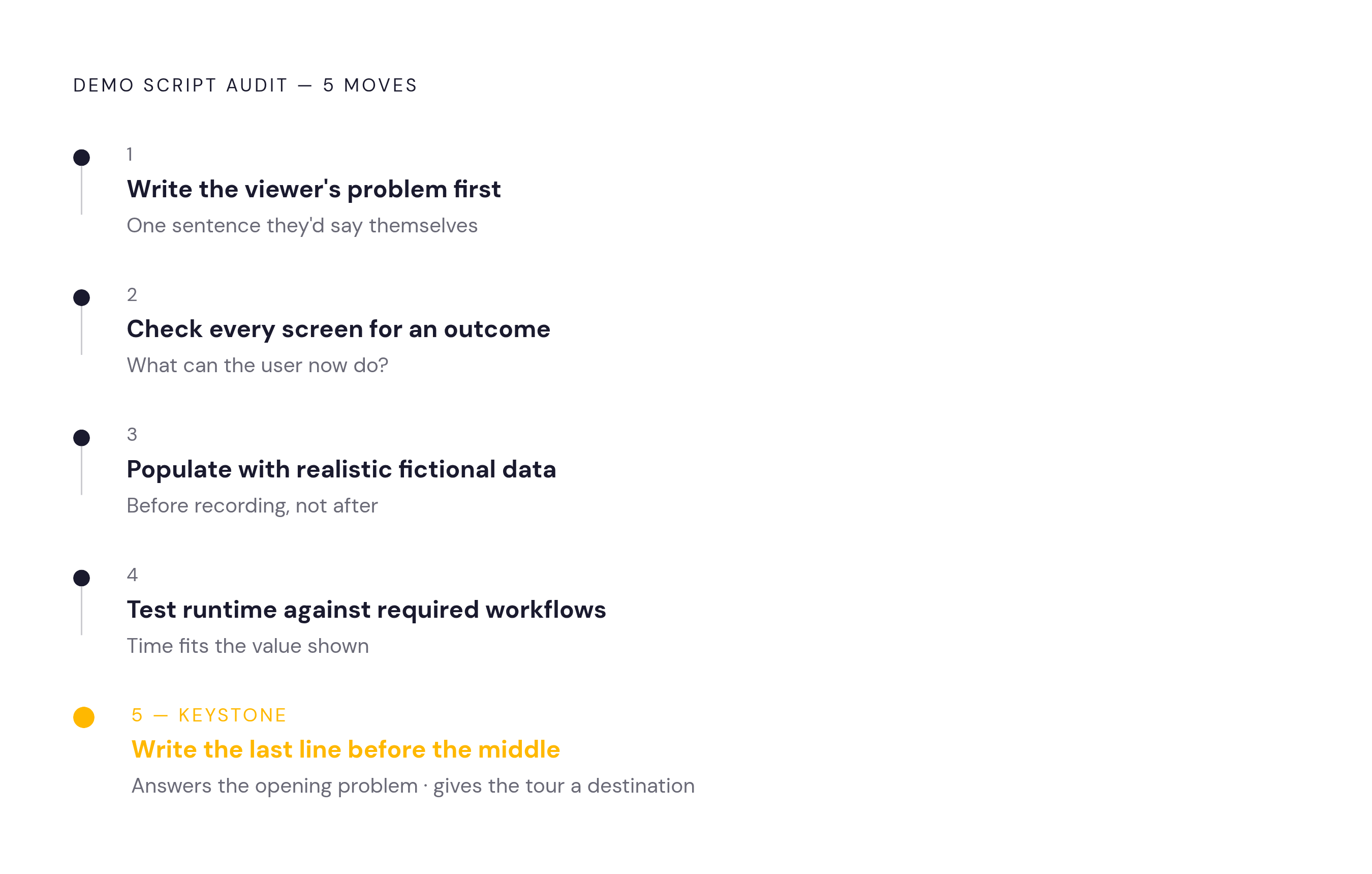
To turn the analysis into an audit, open the existing demo script and apply five concrete checks. First, write the viewer’s problem before writing the script. Use one sentence the viewer might say themselves, rather than a description of the feature the team built. Motion Agency’s B2B demo script analysis found that question-led openings were rare but overperformed, with roughly 40% reaching the top performance quartile, compared with about a quarter overall. That supports considering a question.
Second, check every screen for an outcome. Ask what the user can now do that they could not do before. If a screen only establishes that a feature exists, the segment needs a clearer result. An inventory is useful in a warehouse, less so in a demo.
Third, populate the demo environment with realistic fictional data before recording. Use believable names, job titles, and project names. The scenario should be recognizable without exposing anyone’s private information. This preparation helps the viewer understand the work.
Fourth, test runtime against the workflows required to show value. Consider what disappears if a segment is cut. If cutting a segment prevents the viewer from understanding the result, the time has a purpose. If only repetition disappears, remove it.
Fifth, write the last line before filling in the middle. It should answer the problem set out at the start, as Notion’s closing promise answers the desire for order it opens with. That gives the interface tour a destination. Without it, the script can accumulate useful features and still end merely because someone ran out of features to mention.
What to record and how to capture the demo cleanly before editing begins
With the sequence planned, the recording should remove distractions. Use a clean browser profile or a demo environment set aside for this work, with no extensions, bookmarks bar, or notification badges in view. Populate it with the fictional data prepared for the script. Keep unrelated information out of the frame. The product should not have to compete with the browser’s entire personal history.
Move the cursor more slowly than in day-to-day work. Use a cursor spotlight where it helps viewers follow what happens. Record sections separately so a mistake requires only a local retake. Plan zooms around key interactions, including buttons, form fields, and dashboard metrics. These can be hard to follow in a full-screen recording, especially on mobile. The aim is to make the action visible without asking viewers to hunt for the click.
Editing the recorded demo so structure survives the cut
For a demo with narration, transcript-based editing keeps the story in view as the footage changes. Deleting a sentence cuts its corresponding footage, while rearranging text changes the sequence. That is an approachable starting point for non-editors. It lets the editor check whether the problem, action, and result still fit together without having to make every choice through a timeline.
AI tools can handle a first pass of filler-word removal, silence trimming, captions, and audio enhancement. They do not replace human review. Brand names, proper nouns, and homophones can trip up automatic transcription, so check the text before treating it as finished. A clean-looking caption can still say the wrong thing with impressive confidence.
For social distribution, captions are necessary because a large share of LinkedIn video is watched on mute. Burn them in where sidecar caption files are unreliable, and use.SRT files where native caption support is strong. This supports the narration without excusing an unclear interface tour. Viewers should be able to follow the action.
Visual cleanup has an order, too. Adjust white balance, exposure, and contrast so the clips match before adding a color grade. Templates with an intro, outro, lower thirds, and caption styles save the work of setting them up each time and keep the look the same across versions. None of this requires heavy polish. Minimal editing can feel more genuine in screen recordings, and a lightly edited demo can still have a deliberate, easy-to-follow sequence.
Applying the Notion playbook to specific SaaS contexts: onboarding, async communication, and product launches
For onboarding and documentation, the usable format is one task shown from creation to completion. Notion’s template demos provide the structural model, with a workflow rather than a feature inventory as the organizing unit. A team can use that format to show a page being created or a database being built, ending on the completed result. The finish should be visible in the footage. Stopping after the last click is less useful if the viewer has not yet seen what the click achieved.
For async communication, this means keeping the topic small enough for people to follow without someone there to explain it. After five minutes, people tend to stop paying attention or skip ahead. If a subject genuinely needs more time, split it into parts or consider whether a written document would serve better.
For a product launch, the Calendar video offers a format a team can reuse, with a founder introducing the product before a guided interface tour. Each feature becomes a scene from a believable day, so the tour explains where the product fits. The Agents format offers a different option when the product action is visually self-explanatory. Its lack of narration suits muted feeds and distribution across languages. The choice follows the product’s explanation needs.
The one audit to run on any demo before it goes live
Before publishing, watch the demo on mute and ask whether the problem named at the start is visibly resolved by the end. This combines the clarity test with the narrative test. People can spot the gap without knowing how to edit video.
If the first feature appears before the problem is established, reverse the order. If a segment shows the same value as the previous one from another angle, cut one. If the runtime exceeds what the scope justifies, narrow the problem statement.
The final frame should show why the journey was worth taking. Otherwise, the demo has stopped, but it has not finished.